
AI La Tomatina Generator: Turn Your Photo into a Tomato Festival Portrait
Have you ever wanted to experience Spain’s famous La Tomatina festival without actually travelling there? Now you can bring that experience into your photos with an AI La Tomatina Generator.
La Tomatina is one of the world’s most exciting festivals, famous for its massive tomato fight, colourful streets, and people covered in tomato splashes. With AI photo editing, you can transform an ordinary selfie into a realistic festival photograph filled with flying tomatoes, excited crowds, and a lively Spanish street atmosphere.
The best part is that you don’t need professional photography skills or advanced editing software. Simply upload your photo, choose the La Tomatina style, and let AI transform your picture into a festival-inspired portrait.
In this guide, you’ll learn how an AI La Tomatina Generator works, how to create your own tomato festival photo, and which prompts can help you get better results.
What Is an AI La Tomatina Generator?
An AI La Tomatina Generator is an AI-powered photo transformation tool that turns your regular picture into a realistic La Tomatina festival scene.
Instead of manually adding tomato splashes, changing backgrounds, or editing people into a crowded festival, AI handles the transformation automatically using your reference photo.
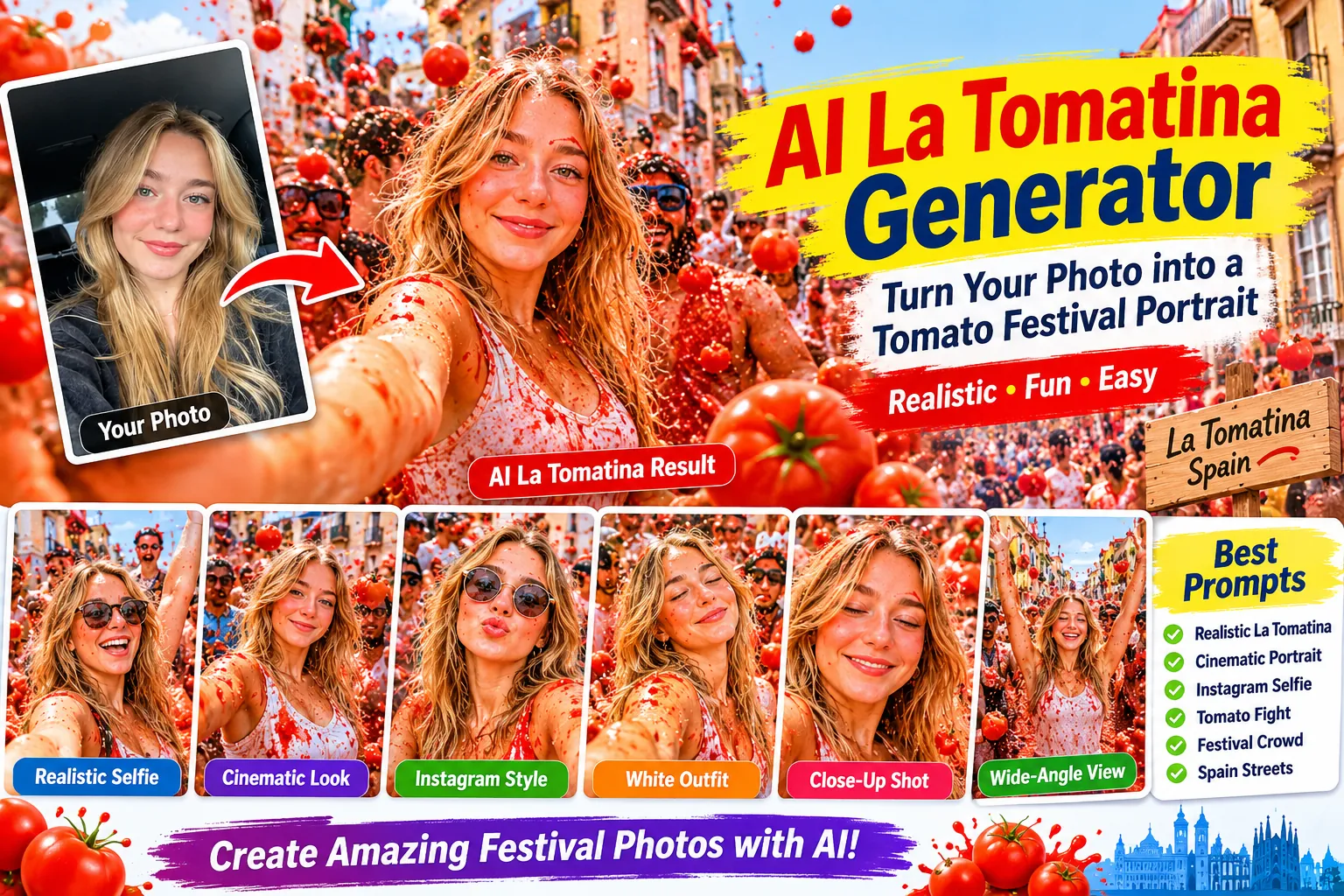
For example, imagine uploading a simple selfie taken inside your car or at home. The AI can transform the background into a busy Spanish street, add flying tomatoes, create realistic tomato splashes on your clothes, and place festival participants around you.
The result looks like you are enjoying the famous La Tomatina celebration in Spain.
What Makes This AI Photo Transformation Interesting?
Realistic festival backgrounds: Replace ordinary backgrounds with crowded Spanish streets.
Flying tomatoes: Add tomatoes flying through the air during a festival fight.
Natural face appearance: Aim to preserve your original facial features and identity.
Tomato splash effects: Add realistic tomato marks to your clothes, hair, and skin.
Crowd atmosphere: Create a lively festival environment with people celebrating around you.
Social media portraits: Generate eye-catching pictures for Instagram, Facebook, and other platforms.
How to Create La Tomatina AI Photos
Creating a La Tomatina festival photo is simple. You only need a suitable reference picture and an AI photo generator that supports image-to-image editing.
Follow these steps:
Step 1: Upload Your Reference Photo
Start by selecting a clear selfie or portrait from your device. A front-facing picture with good lighting usually gives AI a better reference for your face.
For better results, choose a photo where your face is clearly visible and not covered by sunglasses, filters, or other objects.
Step 2: Select the La Tomatina Preset
Choose the La Tomatina festival preset if your AI photo tool provides one.
The preset can guide the AI to create a Spanish tomato festival environment, including flying tomatoes, excited crowds, and colourful street decorations.
Step 3: Generate Your AI Festival Photo
Start the image generation process. The AI will analyse your uploaded photo and create a new festival-inspired scene.
Depending on the tool, generation time and image quality may vary.
Step 4: Preview Your Result
Once the image is ready, check the final result. Pay attention to facial details, hands, clothing, tomato splashes, and the background.
If something looks unnatural, try another generation with a more detailed prompt.
Step 5: Save and Share Your Picture
When you are happy with the result, save your image and share it on your favourite social media platform.
You can also experiment with different prompts to create multiple La Tomatina photo styles.
Best AI La Tomatina Prompts for Realistic Photos
If your AI tool supports custom prompts, you can experiment with different descriptions to create unique festival portraits.
Here are some prompt ideas you can use.
1. Realistic La Tomatina Selfie
2. Cinematic Tomato Festival Portrait
3. La Tomatina Instagram Selfie
4. White Outfit Tomato Fight
5. Close-Up Festival Photography
6. Wide-Angle La Tomatina Adventure
Tips for Getting Better AI La Tomatina Results
The quality of your final image depends on both your reference photo and the instructions you give the AI. A few simple changes can make a noticeable difference.
Use a clear reference image: Choose a photograph with a visible face, natural lighting, and good image quality. Blurry pictures may produce less accurate facial details.
Keep your prompt specific: Instead of writing only “make a tomato festival photo,” describe the location, crowd, clothing, lighting, camera angle, and tomato effects.
Mention facial identity preservation: Include instructions such as “preserve the original facial features and identity” to help maintain a closer resemblance to your reference photo.
Avoid too many effects: Adding excessive tomatoes, splashes, decorations, and background details can make the image look artificial. Keep the main subject clear.
Try different versions: AI image generation can produce different results from the same prompt. Generate a few variations and choose the one that looks most natural.
Why Is La Tomatina a Popular Theme for AI Photo Editing?
La Tomatina offers a visually exciting environment that works especially well for creative AI photography.
Unlike an ordinary portrait, a tomato festival scene has movement, bright colours, crowds, and unusual action. These elements give AI plenty of opportunities to create an interesting transformation.
It is also a fun way to experiment with a different version of your everyday photos. You can turn a simple selfie into an adventurous festival portrait without travelling to Spain or arranging a professional photoshoot.
Another reason for its popularity is social media. Colourful and unusual images naturally attract attention, making La Tomatina-inspired pictures suitable for creative posts, profile pictures, and entertaining photo collections.
What Is La Tomatina Festival?
La Tomatina is a famous annual tomato-throwing festival held in Buñol, a town in the Valencia region of Spain.
During the celebration, participants gather in the streets and take part in a large tomato fight. The event is known for its energetic atmosphere, red tomato-covered streets, and thousands of people enjoying the experience together.
This unique celebration has become an internationally recognised cultural event and an interesting source of inspiration for photographers and digital artists.
AI photo editing brings this colourful atmosphere into your personal pictures, allowing you to create your own festival-inspired memories.
Frequently Asked Questions
1. What is an AI La Tomatina Generator?
It is an AI photo editing tool that transforms ordinary portraits and selfies into La Tomatina-inspired festival photographs featuring flying tomatoes, tomato splashes, and crowded Spanish streets.
2. Can I use my own selfie?
Yes. If your selected generator supports reference image uploads, you can upload your own selfie and use it as the starting point for the transformation.
3. Will AI keep my original face?
AI can attempt to preserve your original facial features and identity. However, results depend on the image model, reference photo quality, and prompt instructions. Some generations may slightly change facial details.
4. Do I need photo editing skills?
No advanced editing skills are required. An image-to-image AI generator can handle the background, tomato effects, and overall festival transformation automatically.
5. Can I create realistic La Tomatina photos?
Yes. Use a clear reference photo and a detailed prompt that describes realistic lighting, natural skin texture, flying tomatoes, and an authentic festival environment.
6. Can I share my AI-generated festival photos?
You can generally share images on social media, subject to the generator’s usage terms and applicable image rights. Avoid presenting AI-generated pictures as genuine photographs of an event you attended.
Final Thoughts
The AI La Tomatina Generator is a fun way to turn an ordinary selfie into an exciting tomato festival photograph. You can experiment with realistic selfies, cinematic portraits, action scenes, and colourful festival backgrounds without spending hours editing pictures manually.
Start with a clear reference photo, choose your favourite La Tomatina style, and experiment with different prompts to find the result you like best.
Whether you want a creative Instagram post or simply want to see yourself enjoying Spain’s famous tomato fight, AI makes this photo transformation easy and enjoyable.